There are two ways to create Pathway models.
Option 1 – From Logic Model (From your Program page, go to your Logic model).
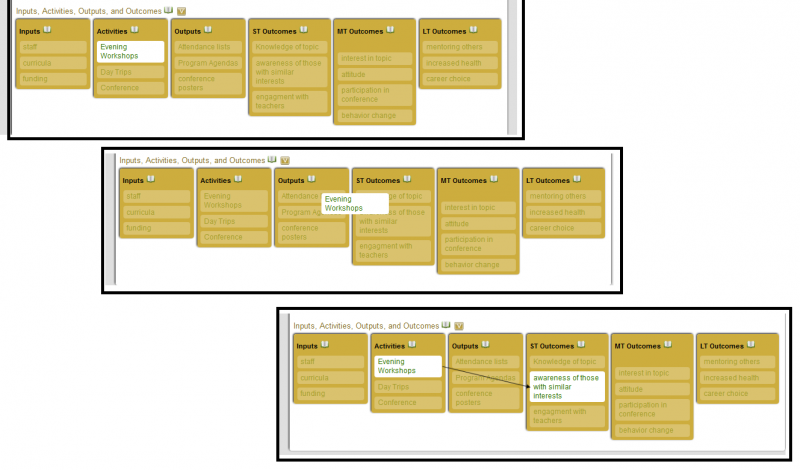
Click and drag activities to the output or the short-term outcome resulting from that activity.
Click and drag short-term outcomes to the short-term or medium-term outcome that follows.
Click and drag medium-term outcomes to another medium-term outcome or a long-term outcome the follows.
Click and drag long-term outcomes to other long-term outcomes that follow.
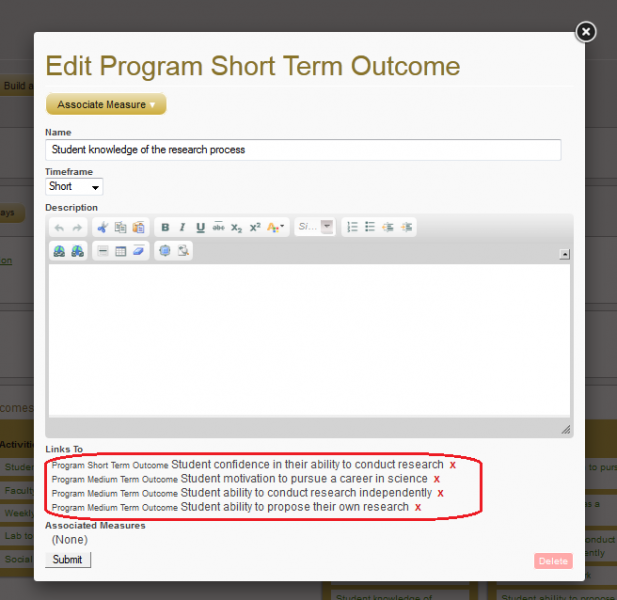
Delete paths by opening the source activity or outcome (begining point of a path), and deleting the appropriate path listed at the bottom of the edit box.
Option 2 – From Pathway Model (From your Program page, go to the Logic Model section and click on “display pathways”)
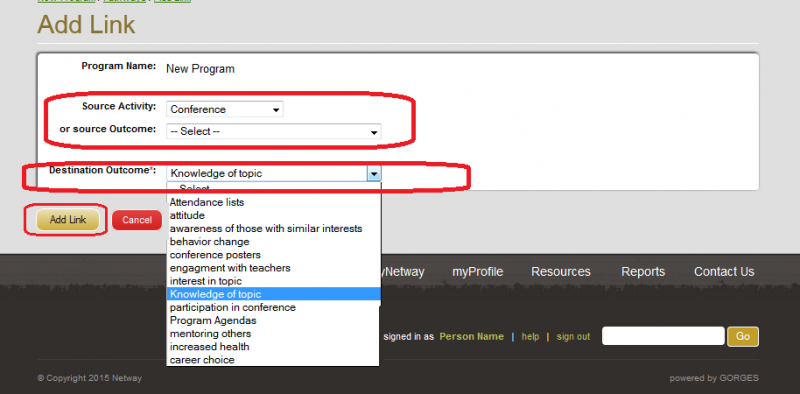
Click on the “add link” link to the right of the “Delete Links” section.
Under “Source activity” or “Source Outcome” select an activity or outcome from the drop-down menu.
Under “Destination Outcome” select the appropriate outcome.
Click on “Add Link”.
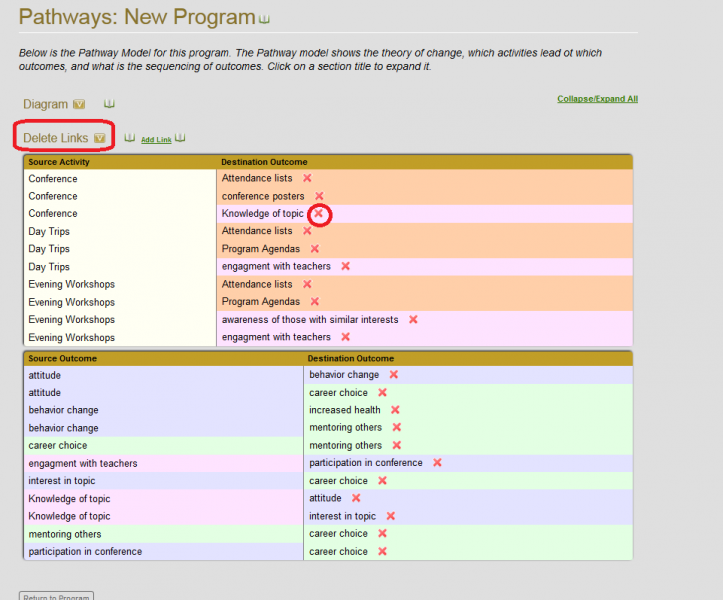
View the pathway under the “Diagram” section.
Delete pathways by opening the “Delete Links” section and clicking the red X to the right of the pathway you want to remove.
Q&A
Q: How do you connect outcomes to activities?
From the Logic Model section of your program, you may “click and drag” an activity or outcome onto another outcome to create a link. You can also do this from the Pathway Model page, at the bottom of the page there is an “add link” option.
Q: If two outcomes reinforce each other, how do I relate them in my pathway model?
There are times when two outcomes mutually reinforce each other. In cases like these, you can have arrows going both ways between the two outcomes in the pathway model. This representation stays true to your perception of how the program works. That particular area of the pathway model could be a good candidate for exploring in the evaluation planning process, exactly because of this interdependence. As you are deciding whether or not to use arrows going both ways, consider the impact on the overall readability and usefulness of the model. Does the importance of displaying that mutual reinforcement outweigh the risk of visual clutter?
Q: In a Pathway model, can I have a short-term outcome lead to another short-term outcome?
Yes you can. In fact, it is often advisable. Doing so will let you present a more detailed and nuanced picture of the underlying process of change for the program. The resulting level of specificity is often necessary for the pathway model to be useful. Thinking ahead to the evaluation effort, since evaluating short-term outcomes is usually more feasible than evaluating more distant mid- or long-term outcomes, it can be advantageous to have early specific changes represented in detail.
Q: What is the difference between a logic model and a pathway model?
A logic model is a representation of the main components of a program and the theory of change underlying that program. Both the columnar model and the pathway model are types of logic models. These two types have a lot in common, but each also has unique features. Both models include activities, outputs and outcomes. The columnar logic model also includes inputs, context and assumptions. These components provide important information about what it takes to run this program, what environments it is designed for, etc. This information is useful to others who might want to replicate or learn from this program, and may be important aspects to evaluate. A pathway model does not include inputs, context, or assumptions but it has causal arrows between activities and outcomes, creating a graphical representation that highlights the theory of change in a much more specific and detailed way. These arrows make it possible to see and follow the story-lines that explain how the program seeks to achieve its goals. The graphical representation allows for detailed, shared understanding of what the program is and how it works – this forms an invaluable foundation for making good evaluation decisions.