Programs are the backbone of Netway. Before you can develop your program model or begin to create your evaluation plan, you must create a program in the Netway. In order to create a program you have two options:
1. Start from your “My Netway” page, and click the “Create New Program” Button.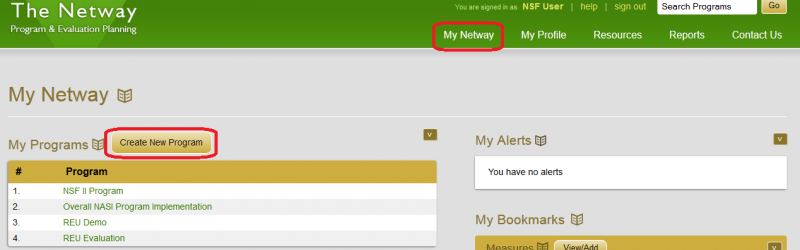
OR
2. Start from your “My Profile” page, and select the “Create New Program” link. 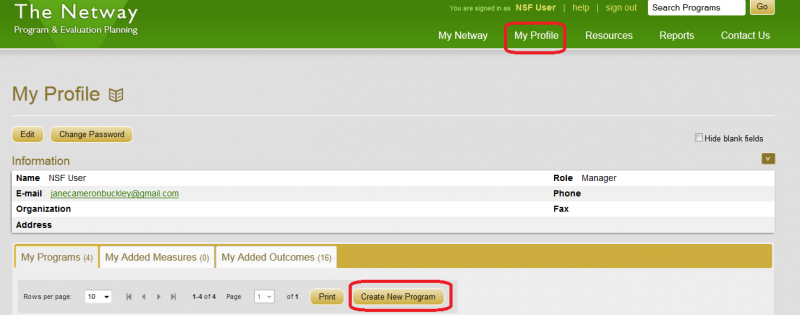
In the program box, add a name, description, office, and mission if you’d like – you can come back and edit this all later. For easy access and reporting, select which playlist to add this to. If you decide to not add it to you playlist, you will need to access it through your list of authorized programs (found on “My Netway”, as well as “My Profile”).
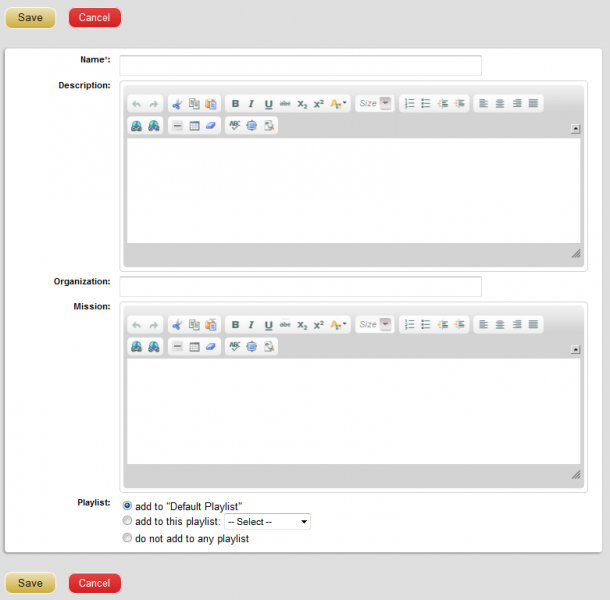
Click “Save”.
Use Netway Resources to work through the steps of the Protocol to develop text for your Program mission, description, stakeholder map, and logic model.
Note – You will be automatically authorized on any programs you create.
Now you may authorize others to work on your program (see Authorizing Users) or move on to editing your program information. (Keep in mind that if you authorize anyone else to your program, they will have the power to remove you from the program too – so only authorize people you trust).
To bring this program to someone’s attention, “Share” it with them.
Q&A
Q: How can I find programs I'm authorized to edit?
You can view all programs in the Netway, but you can only edit those you are authorized on. Your programs are listed on “My Netway” under “My Programs”, and also on “My Profile” in the middle of the page.
Q: What is the difference between the program mission statement and program description?
A program mission statement is a very short description of the ultimate goals of the program (help prepare students for college, increase energy efficiency of farms through education, etc.), while a program description is a concise yet complete description of the program itself.